
Discovery Session Enquiry
Interested in BricsCAD and want to speak to our experts on how best we can help you? Complete the form below and someone will be in touch to assist you.
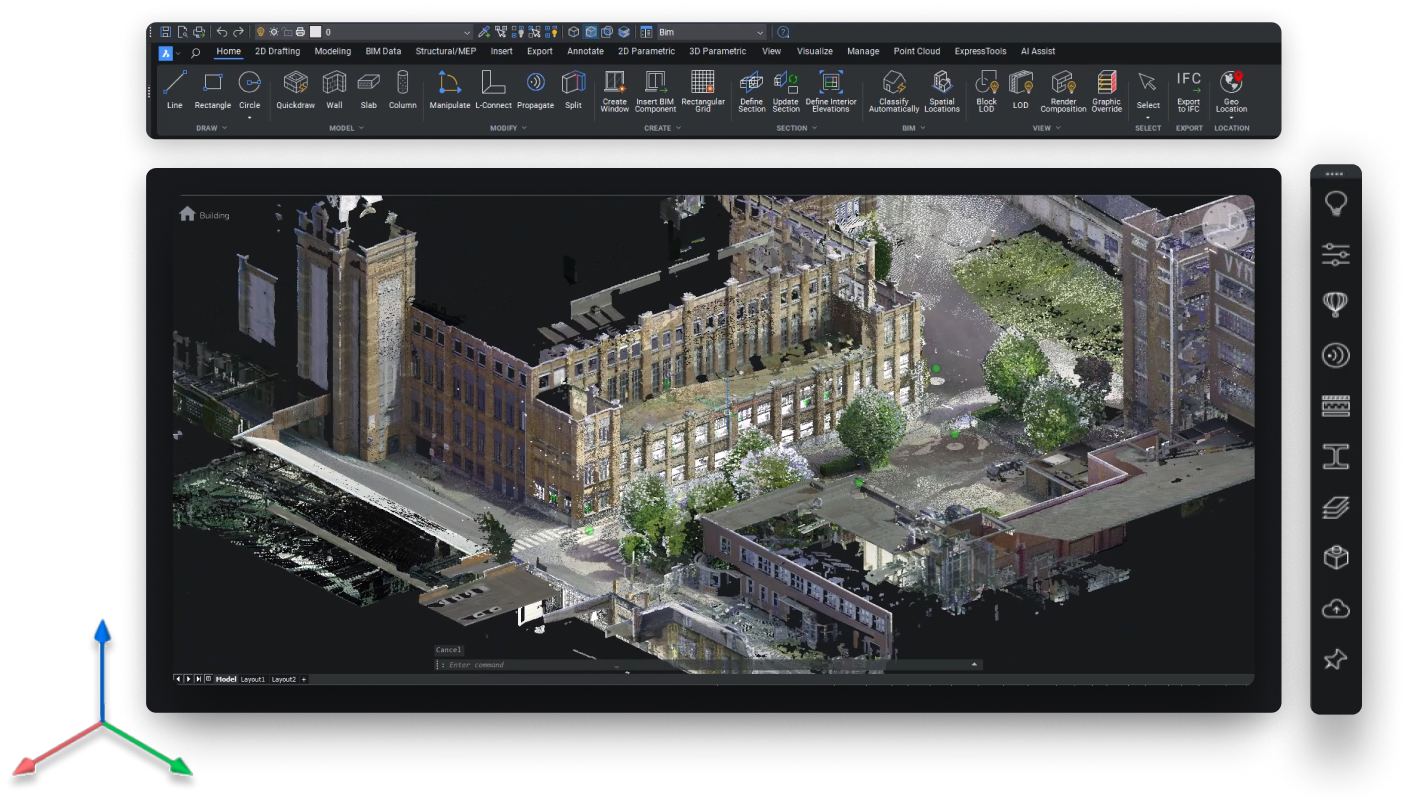
BricsCAD BIM brings classification, building data, IFC exchange and model generated drawings into a native DWG environment. It gives practices already working in DWG a practical way to adopt BIM without abandoning established files and workflows.
Official UK BricsCAD Reseller
20+ Years in CAD
30 Day Trial, No Payment


Companies Using BricsCAD







BricsCAD BIM is a DWG based CAD platform for building design. It includes the tools and features of BricsCAD Pro, then adds a dedicated BIM toolset for classifying building elements, managing building data, exchanging IFC and generating plans, sections and elevations from the model.
DWG is the working model format, not simply an export at the end of the process. BIM information is added to the model and documentation is generated from it, while your geometry remains in DWG. That makes BricsCAD BIM particularly relevant to practices with an established DWG workflow that now need to deliver structured BIM data and IFC.
BricsCAD BIM includes the 2D drafting and 3D modelling tools found in BricsCAD Pro, with additional BIM specific toolsets for building design and documentation. Every tool included comes with a free step by step guide, helping you understand how it works and how to get the most from it.
01
BIMIFY analyses existing 3D geometry and automatically assigns BIM classifications and spatial structure. Walls, slabs, roofs, beams and columns can be identified from the geometry, giving an existing 3D model the information needed to start becoming a structured BIM model.
02
Automatic classification removes much of the repetitive work, without pretending every building is predictable. Unusual geometry and non standard elements can be reviewed and reclassified manually, giving you control over the final model rather than relying entirely on automation.
03
Once classified, the model becomes the foundation for the wider BIM workflow. Property sets can be added, plans and sections generated from the model, and structured information exchanged through IFC while the geometry remains in DWG.
Choose a subscription for access to every new release, or a perpetual licence if you prefer to keep the software long term. If you are unsure which option suits your practice, we can help you compare them.
Every new release included, automatically
No large upfront commitment
Support included for as long as you subscribe
Everything in the annual subscription
Price fixed for three years
One purchase order instead of three
£429 less than three years of subscription
Yours to keep, on the version you buy
Maintenance included for the first year
To find out whether BricsCAD BIM is right for your practice, our team can guide you through the software using your own project. You can see how BricsCAD BIM handles your work and ask our BIM expert questions specific to your workflow.
BricsCAD BIM is designed for practices focused on building design, combining the 2D drafting and 3D modelling tools of BricsCAD Pro with BIM classification, IFC exchange and model generated documentation. If your work also extends into mechanical design or manufacturing, BricsCAD Ultimate brings the BIM and Mechanical toolsets together in one package, giving you a broader set of tools for projects that move beyond building design.
| Pro, BIM & Ultimate Side by Side Feature | BricsCAD Pro | BricsCAD BIM | BricsCAD Ultimate |
|---|---|---|---|
| +Native DWG | Included | Included | Included |
| +2D Drafting & Annotation | Included | Included | Included |
| +3D Solid & Direct Modelling | Included | Included | Included |
| +Parametric Modelling | Included | Included | Included |
| +LISP & Third-party Applications | Included | Included | Included |
| +IFC Import & Export | Not included | Included | Included |
| +BIM Classification & Bimify | Not included | Included | Included |
| +BIM Design Documentation | Not included | Included | Included |
| +BCF Collaboration | Not included | Included | Included |
| +Mechanical Tools | Not included | Not included | Included |
| Price From | £635 per year |
£940 per year |
£1,060 per year |
If your work is general 2D drafting and 3D design and nobody is asking you for IFC or building data
If building design is one discipline among several. Ultimate puts BIM and Mechanical in one licence.
Send us your project's information requirements and we will tell you whether this covers them.
"Great service and support from day one. Always quick to respond and genuinely helpful. The software works flawlessly for my engineering needs. Highly recommended."
Sylwester Kowalski, CSS20 Construction Site Service Ltd
Many BIM platforms are sold primarily through subscription, but BricsCAD BIM gives you a choice. Through NORI CAD, you can purchase either a subscription or a perpetual licence, giving you the flexibility to choose the licensing model that best suits your practice.
Our support continues beyond the purchase. From your first conversation, a dedicated account manager can help you choose the right licence, answer questions about BricsCAD BIM and provide ongoing guidance with licensing and support as your requirements develop.
A subscription is £940 per year, three years is £2,541, and a perpetual licence is £2,112 as a one-off. All prices exclude VAT. Perpetual includes maintenance for the first year, after which you renew maintenance to keep receiving updates.
Yes. A perpetual licence is £2,112 as a one-off purchase and it is yours to keep. That is £429 less than three years of subscription, and it does not stop working at the end of them. You stay on the version you buy unless you renew maintenance each year.
BIM classification including Bimify, building data and property sets, IFC import and export, BCF collaboration, and design documentation generated from the model. Everything in BricsCAD Pro is included as well.
It imports IFC2x3, IFC4, IFC4x1 and IFC4x3, and exports IFC2x3 and IFC4. Classifications, spatial structure and property sets come across on import, and a large federated model can be exploded into XRefs by building or by storey.
It models, carries data and produces documentation. Coordination is interference checking between 3D solids rather than a dedicated clash and issue management system, and several people cannot author the same model at once. Tell us what your project requires and we will say plainly whether this covers it.
BIM if building design is all your practice does. Ultimate if it is one discipline among several, because it includes both BIM and Mechanical in a single licence and usually works out cheaper than buying the editions separately.
Yes, if they are DWG files. BricsCAD is built on DWG, so they open and save without a conversion step, and the BIM model you build sits in that same format.
Discovery Session Enquiry
Interested in BricsCAD and want to speak to our experts on how best we can help you? Complete the form below and someone will be in touch to assist you.