
BricsCAD® V25 is here, packed with powerful new features and improvements designed to supercharge your CAD workflows. This latest version introduces innovative tools and commands that set BricsCAD® apart from other CAD software. Whether you’re an architect, engineer, or designer, BricsCAD® V25 brings intuitive workflows, improved performance, and advanced AI-driven capabilities to help you work smarter and faster.
Let’s take a deep dive into the unique new and enhanced features that make BricsCAD® V25 a must-have for professionals.
Why Upgrade to BricsCAD® V25?
BricsCAD® V25 has been carefully developed to provide a seamless, efficient, and high-performance CAD experience. Here’s what makes this version stand out:
- Enhanced Workflow Compatibility – Ensures smooth integration with your existing CAD tools.
- Streamlined and User-Friendly Workflows – Makes designing easier and more efficient.
- Improved Interoperability – Enhances compatibility with various design data formats.
- AI-Powered Innovations – Leverages artificial intelligence to optimize CAD processes.
- Professional-Grade Performance – Offers top-tier performance for large and complex drawings.
Now, let’s explore the key new and improved features that make BricsCAD® V25 a game-changer.
Seamless Workflow Compatibility with Existing CAD Tools
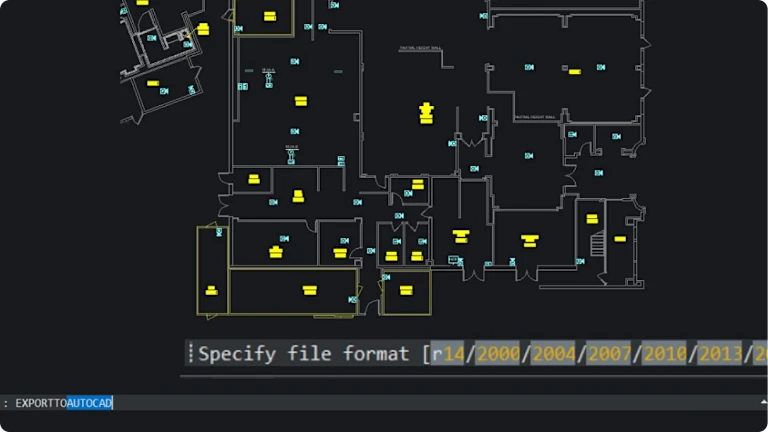
NEW: EXPORTTOAUTOCAD® Command

One of the most exciting additions to BricsCAD® V25 is the EXPORTTOAUTOCAD® command. This powerful new feature allows users to:
- Create a new drawing file with AEC entities converted into blocks.
- Improve compatibility with AutoCAD®-based workflows.
- Simplify the sharing of drawings across different CAD platforms.
ENHANCED: User Interface – CUI Shortcuts

BricsCAD® V25 brings improvements to the user interface with upgraded CUI shortcuts, offering:
- Better search functionality for missing attachments.
- Improved panel status updates for a more intuitive user experience.
- A more efficient workflow with enhanced customization options.
ENHANCED: Built-in Parametric, 2D, and 3D Blocks Library

Working with blocks has never been easier! The enhanced Blocks Library allows users to:
- Access a robust collection of parametric, 2D, and 3D blocks.
- Improve efficiency with familiar tools and features.
- Streamline design workflows with an optimized block management system.
Effortless and Streamlined Workflows
ENHANCED: BricsCAD® Status Bar
The Status Bar in BricsCAD® V25 has been upgraded to:
- Feature clearer icons and text-based buttons for improved visibility.
- Provide easier access to critical functions.
- Speed up workflow by making tools more accessible at a glance.
This enhancement makes navigating BricsCAD® V25 more intuitive and efficient.
Enhanced Design Data Interoperability
NEW: Support for Additional Point Cloud Formats
BricsCAD® V25 now includes expanded point cloud format support, allowing users to:
- Import and work with Riegl, Z+F, and LGSx formats.
- Improve interoperability with a wider range of 3D scanning technologies.
- Work seamlessly with point cloud data for advanced modelling and analysis.
Innovative AI-Powered Features
NEW: Experimental Feature Mode

BricsCAD® V25 introduces an Experimental Mode, a sandbox environment where users can:
- Test and explore cutting-edge features under development.
- Gain early access to innovative tools before their full release.
- Contribute feedback on experimental functionalities.
This mode allows users to stay ahead of the curve with the latest BricsCAD® advancements.
ENHANCED: BLOCKIFY Command

The BLOCKIFY command has been significantly improved to:
- Support Parametric Block features.
- Provide a more powerful and efficient workflow for block automation.
- Automatically detect and convert repetitive geometry into blocks for improved file management.
These AI-driven enhancements help users automate tedious tasks and optimise their workflow.
High-Performance Professional CAD Software
ENHANCED: Large Drawing Clean-Up Workflow
Working with large files? BricsCAD® V25 has you covered with an improved DWGHEALTH clean-up workflow, designed to:
- Maintain peak performance for large and complex drawings.
- Detect and fix issues within DWG files efficiently.
- Optimize files for faster processing and smoother performance.
This feature ensures that even the most intricate projects run seamlessly within BricsCAD.
Upgrade to BricsCAD® V25 Today!
Now is the perfect time to upgrade! BricsCAD® V25 delivers next-level CAD functionality, making your workflows more efficient, intuitive, and powerful.
Get BricsCAD® V25 today and take advantage of these game-changing features.
Not ready to commit? Try the 30-day trial and explore all the new enhancements for yourself!
Learn More About BricsCAD® V25
Want to dive deeper into everything BricsCAD® V25 has to offer?
- Catch up on the BricsCAD® V25 launch event to see the latest features in action.
- Explore breakout sessions and tutorials to master new tools and workflows.
- Learn more about BricsCAD® V25 here.
Experience the future of CAD with BricsCAD® V25—your go-to solution for powerful, professional-grade design software.